
 Windows Products
 Mac Products



- Windows Products
- Video Converter Ultimate

- Blu-Ray Ripper
- HD Video Converter
- Mac Products
- Video Converter Ultimate Mac
- Blu-ray Ripper for Mac
- HD Video Converter for Mac
HD Video Converter for Mac Overview
HD Converter for Mac is an all-in-one video converter program that supports converting 1080p/720p HD MKV, MOV, MXF, MTS, M2TS, M2T, TS, TiVo, M4V, MP4, AVI, MPG, VOB, WMV, ASF, 3GP, FLV, F4V videos to any video formats for playing, editing, uploading or burning on Mac OS X. The Mac HD Video Converter can transcode HD footage from Sony, Canon, Nikon, Panasonic and JVC. Moreover, it's capable of outputting videos in Apple ProRes/AIC/DNxHD/DVCPRO, etc. for NLEs like iMovie, Final Cut Pro, Avid Studio, Adobe Premiere Pro CC, Kdenlive, Keynote, Avid Xpress Pro, Adobe Creative Suite, Adobe After Effects CC, DaVinci Resolve, iPhoto as well as QuickTime MOV for playback on Mac.
For users that like to take videos/movies with portable devices, HD Video Converter for Mac has many built-in presets for iPhone/iPad/iPod, Apple TV; Android phone/tablet such as Galaxy Tab S8, Galaxy S22, Galaxy Note 20, Google Pixel 6 Pro, Kindle Fire HD, Xperia 1 III, Moto G; Windows tablet/phone and other devices like PlayStation 5, Xbox Series X, WDTV, etc.
Key Feature of HD Video Converter for Mac
Comprehensive editing function
Get any time-length clips from source file exactly by setting the start and end time or casually drag the slider bar. Trim function allows you to get a specific length of video accurately; while crop can help you cut off the black edges and unwanted video area easily, so that you can enjoy a wider screen on your portable devices like iPod, iPhone.
Its watermark function allows you to add different watermark types, including text, image (including GIF), and video watermark. Its video watermark function will add a picture-in-picture effect on your video.
Follow the pencil-like icon on the top to locate the 3D editing feature. It offers Red-Blue, Red-Green two effects and details settings includes Depth and Color Control.
Click the pencil-like icon on the top and find Subtitles tab, click Browse to load your prepared subtitles into this video.
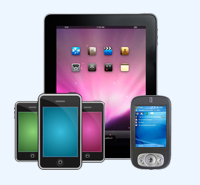
Manifold Mobile players
Aovsoft HD Video Converter for Mac supports almost all IOS, Android and Windows portable devices, HD media players and TVs like iPad Air, iPhone 13 Pro Max, Apple TV 4K, PlayStation 5, Surface Go, OnePlus 10 Pro, Xperia 1 II, HTC U12 Plus, Xbox One Series X; Samsung, LG, Panasonic, Sharp, Sony, Vizio, Hair, Smart TVs, etc.

Professional HD video converter on Mac
HD Converter for Mac could convert HD video to HD video, HD video to SD video, and SD video to HD video. Mainstream video formats such as MXF/MTS/M2TS/Tivo/MOV/M4V/MP4/AVI/WMV/FLV/F4V are well supported to convert to each other; moreover, NLE video codecs are supported smoothly like ProRes for FCP X, AIC for iMovie, DNxHD for Avid, MPEG for Premiere Pro and so on.
Specification of HD Video Converter for Mac
| Input formats | Video | Video formats (*.avi,*.divx, *.wmv, *.wma, *.asf, *.dvr-ms, *.wav, dts in wav, *.rm, *.rmvb, *.ra, *.mov, *.qt, *.mp4, *.3gp, *.3g2, *.dv, *.m4b, *.m4v, *.m4a, *.aac, *.flv, *.f4v (YouTube, Hulu, Fox, etc.), *.dat, *.mpg, *.vob, *.mod, *.tod, *.mxf (partial), *.mov from JVC, Panasonic, Canon, Nikon, Sony cameras and camcorders, *.m2v, *.m2t, *.m2ts (Blu-ray), *.ts, *.tp, *.evo, *.mkv, *.dv, *.tivo); |
|---|---|---|
| Audio | Audio formats (*.au, *.mp3, *.mp2, *.flac, *.ape, *.ogg, *.8svx, *.aiff,*.aif, *.caf, *.dts, *.smv, *.tta, *.voc) | |
| Image | *.jpg, *.ico, *.bmp, *.png, *.gif, *.tiff | |
| Others | *.flc, *.fli,*.gxf, *.pss, *.mvi, *.mtv, *.vdr, *.pmf, *.pva, *.k3g, *.vp6, *.nsv, *.nuv, *.dmskm | |
| Output Formats | Video | Common video formats: Flash video: (*.flv, *.f4v, *.swf) |
| Audio | MP3, AAC, FLAC, MKA (MKA(Matroska) Audio), OGG (Ogg Vorbis Audio), WAV(Nokia WAV Audio), M4A (Nokia M4A Audio) | |
| Supported Devices | iPad, iPad Mini, iPad Pro, iPad Air, iPhone, Apple TV Archos, Creative ZEN, iRiver, Sansa, Sony Walkman, ZEN Player, Zune Dell Player, General Pocket PC, HP iPAQ NDS, PS3, PSP, PS4, PS4 Pro, PSs, Wii, Xbox 360, Xbox 720, Xbox One, Xbox One S, Xbox Series X All the Android Smartphines and tablets |
|
System Requirements
Processor: Intel® processor
OS Supported: Mac OS X 10.4 or above
Hardware Requirements: 512MB RAM, Super VGA (800×600) resolution, 16-bit graphics card or higher